

Como Fazer uma Apresentação de Estudo de Caso Que Conte uma História Clara
Um guia prático para construir uma apresentação de estudo de caso baseada em evidências com um problema claro, decisão, abordagem, resultado mensurável e lição transferível.

Um guia prático para construir uma apresentação de estudo de caso baseada em evidências com um problema claro, decisão, abordagem, resultado mensurável e lição transferível.
Uma apresentação de estudo de caso é persuasiva quando o público consegue ver o que mudou, por que mudou e o que prova a mudança. Os decks mais fortes não se limitam a resumir um projeto em ordem cronológica. Eles transformam o caso em uma história baseada em evidências: uma situação significativa, um problema custoso, uma decisão consequente, uma abordagem credível, um resultado mensurável e uma lição que o público pode usar.
Essa estrutura funciona para histórias de sucesso de clientes, projetos de consultoria, campanhas de marketing, projetos de produtos, casos acadêmicos, melhorias operacionais e apresentações de portfólio. Os detalhes variam, mas o padrão de prova não: o resultado deve estar conectado à intervenção, e não apenas colocado ao lado dela como uma afirmação sem suporte.
Um estudo de caso escrito pode preservar o histórico, citações, detalhes de implementação e contexto metodológico. Uma apresentação precisa criar entendimento em tempo real.
Isso significa que o deck deve tomar cinco decisões em nome do leitor:
As diretrizes de estudo de caso do CDC recomendam definir o público e os objetivos de aprendizagem antes de escrever, cobrindo então o contexto, o problema, a resposta, os desafios, os resultados e as lições. OpenStax descreve de forma semelhante os estudos de caso através de histórico, métodos, descobertas e análise. Para uma apresentação, esses ingredientes se tornam mais eficazes quando organizados em torno de uma mudança visível, em vez de apresentados como um esboço de relatório.
Antes de projetar os slides, escreva o caso em uma frase:
[Quem] enfrentou [problema específico de alto risco]; após [intervenção decisiva], [evidência credível de mudança] mostrou [resultado significativo], revelando [lição transferível].
Por exemplo:
Uma equipe de suporte regional enfrentou tempos de espera crescentes após um rápido crescimento de clientes; após separar solicitações simples de casos especializados e redesenhar as regras de roteamento, o tempo médio de resposta diminuiu enquanto a satisfação melhorou, mostrando que a segmentação da demanda — e não o aumento de pessoal — foi a principal alavanca de capacidade.
Observe o que esta frase não inclui: cada workshop, stakeholder, ferramenta ou tarefa concluída durante o projeto. Esses detalhes importam apenas quando explicam por que a intervenção funcionou ou ajudam outro público a aplicar a lição.
Se a frase contiver três problemas diferentes, quatro intervenções e cinco resultados não relacionados, o caso ainda não está focado o suficiente para uma apresentação.
A sequência a seguir cria tensão, explicação, prova e transferência:
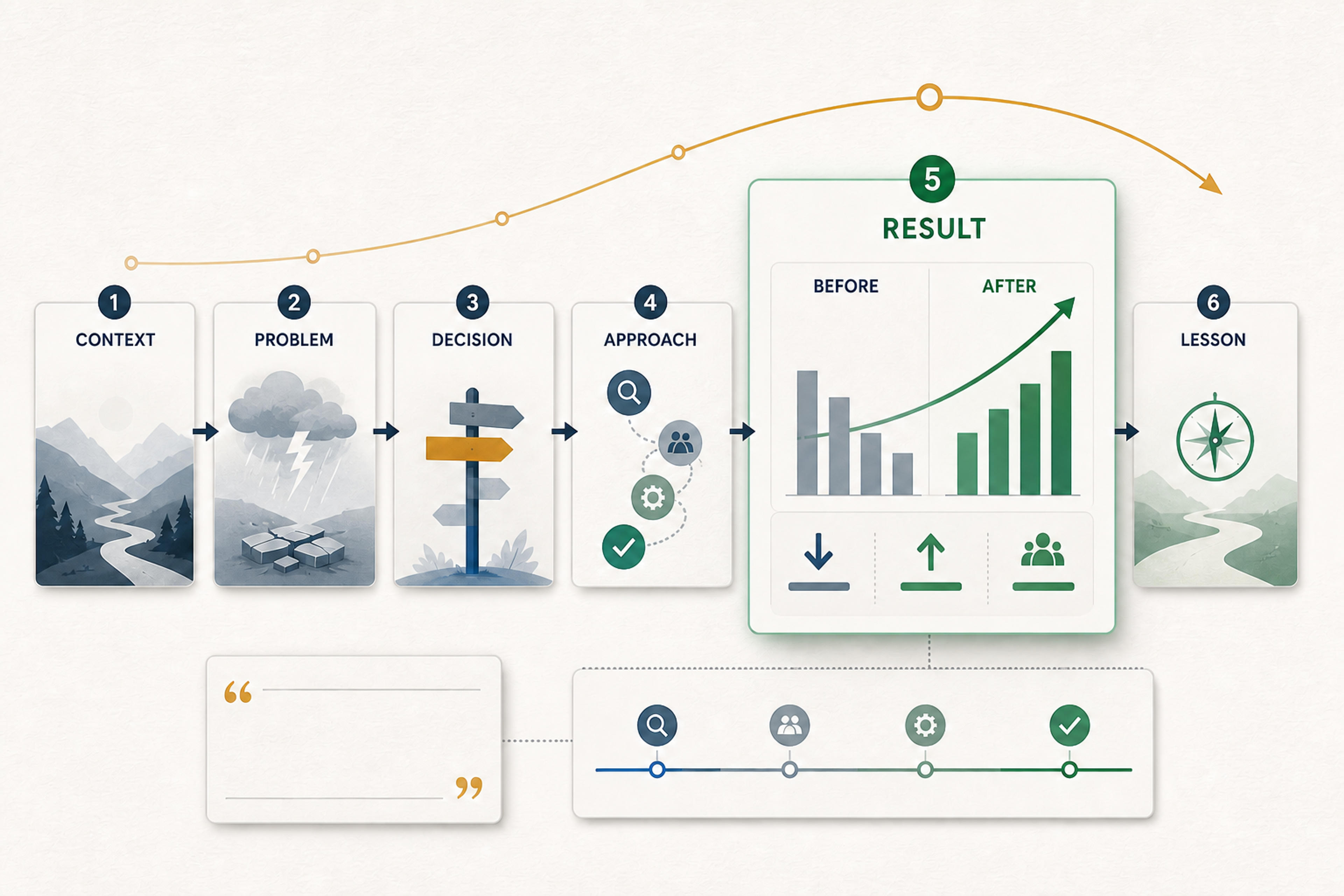
A etapa de decisão frequentemente falta em estudos de caso fracos. Sem ela, a equipe parece passar automaticamente do problema para a atividade. Mostrar a decisão torna os atores visíveis, esclarece a troca e dá ao público um motivo para se importar com a abordagem.
Um caso conciso de cliente pode funcionar em 7 a 10 slides. Uma apresentação de consultoria ou um caso acadêmico podem exigir análise adicional e material de apêndice.
| Slide | Pergunta que responde | Conteúdo recomendado |
|---|---|---|
| 1. Título focado no resultado | Por que devo prestar atenção? | O resultado ou a transformação, não “Estudo de Caso” |
| 2. Panorama da situação | Quem estava envolvido e o que importava? | Organização, usuário, mercado ou contexto operacional relevante |
| 3. O problema em evidência | O que estava dando errado? | Métrica de linha de base, comportamento observado, falha de processo ou dor do cliente |
| 4. A decisão | Que escolha mudou o caminho? | Opções, restrições, trade-offs e direção escolhida |
| 5. A abordagem | O que foi realmente feito? | Três a cinco ações interligadas, não uma lista de todas as tarefas |
| 6. Implementação | Como a mudança aconteceu? | Cronograma, papéis, lançamento, experimento ou modelo operacional |
| 7. Resultados | O que mudou? | Comparação antes e depois com período e definição |
| 8. Por que funcionou | O que conecta a ação ao resultado? | Mecanismo, comportamento de adoção, mudança de processo ou evidência qualitativa |
| 9. Lição e próximo passo | O que o público deve levar? | Princípio transferível, recomendação e CTA |
Use um apêndice para metodologia detalhada, métricas secundárias, trechos de entrevistas, capturas de tela de implementação e análises alternativas. O deck principal deve permanecer narrativamente completo sem eles.
Faça o upload para o SlidesPilot e transforme o contexto, o desafio, a abordagem, as evidências e os resultados em um PowerPoint estruturado e editável.
Transformar Meu Estudo de Caso em SlidesPúblicos de vendas, executivos e de portfólio frequentemente se beneficiam de uma abertura focada no resultado:
Isso é mais útil do que “Estudo de Caso de Sucesso do Cliente” porque informa ao público o que o caso prova.
Para ensino ou discussão acadêmica, você pode intencionalmente reter o resultado e apresentar um caso que force uma decisão. Nesse formato, dê ao público o contexto, as evidências e as alternativas disponíveis na época, peça que tomem a decisão e revele o resultado mais tarde. A abertura correta, portanto, depende da função que o caso deve desempenhar.
Um caso não tem tensão se o problema for descrito apenas com adjetivos: ineficiente, fragmentado, difícil, desatualizado ou de baixo desempenho.
Substitua rótulos por consequências observáveis:
Um slide de problema forte geralmente combina um sinal de linha de base com uma consequência humana ou operacional. Por exemplo, um gráfico de tempo de resolução crescente pode ser combinado com um processo simplificado mostrando onde os casos estagnaram. Essa combinação torna visíveis tanto a escala quanto o mecanismo.
Evite inflacionar os riscos. Um caso credível é mais persuasivo do que um dramático. Declare o limite real: qual equipe, período de tempo, mercado, segmento de cliente ou processo o problema afetou.
A maioria dos projetos contém um momento em que a equipe escolheu entre caminhos concorrentes. Esse momento é o centro intelectual do caso.
Use um slide de decisão para mostrar:
Isso pode ser uma tabela de comparação simples, árvore de decisão, 2x2 ou um conjunto de princípios alternativos. Não fabrique opções após o fato para fazer o caminho escolhido parecer inevitável. O valor vem de mostrar o raciocínio genuíno.
As equipes de projeto frequentemente sobrecarregam a seção de abordagem porque se lembram do trabalho em tarefas: descoberta, workshops, entrevistas, design, implementação, lançamento, treinamento e relatórios.
O público precisa de um número menor de ações ligadas ao resultado. Pergunte a cada atividade: O que mudou por causa deste trabalho?
Em vez de:
escreva:
Agora o público pode ver como as ações formam um mecanismo em vez de um calendário.
Nem toda métrica é igualmente persuasiva. Comece com a afirmação do resultado e, em seguida, identifique as evidências necessárias para apoiá-la.
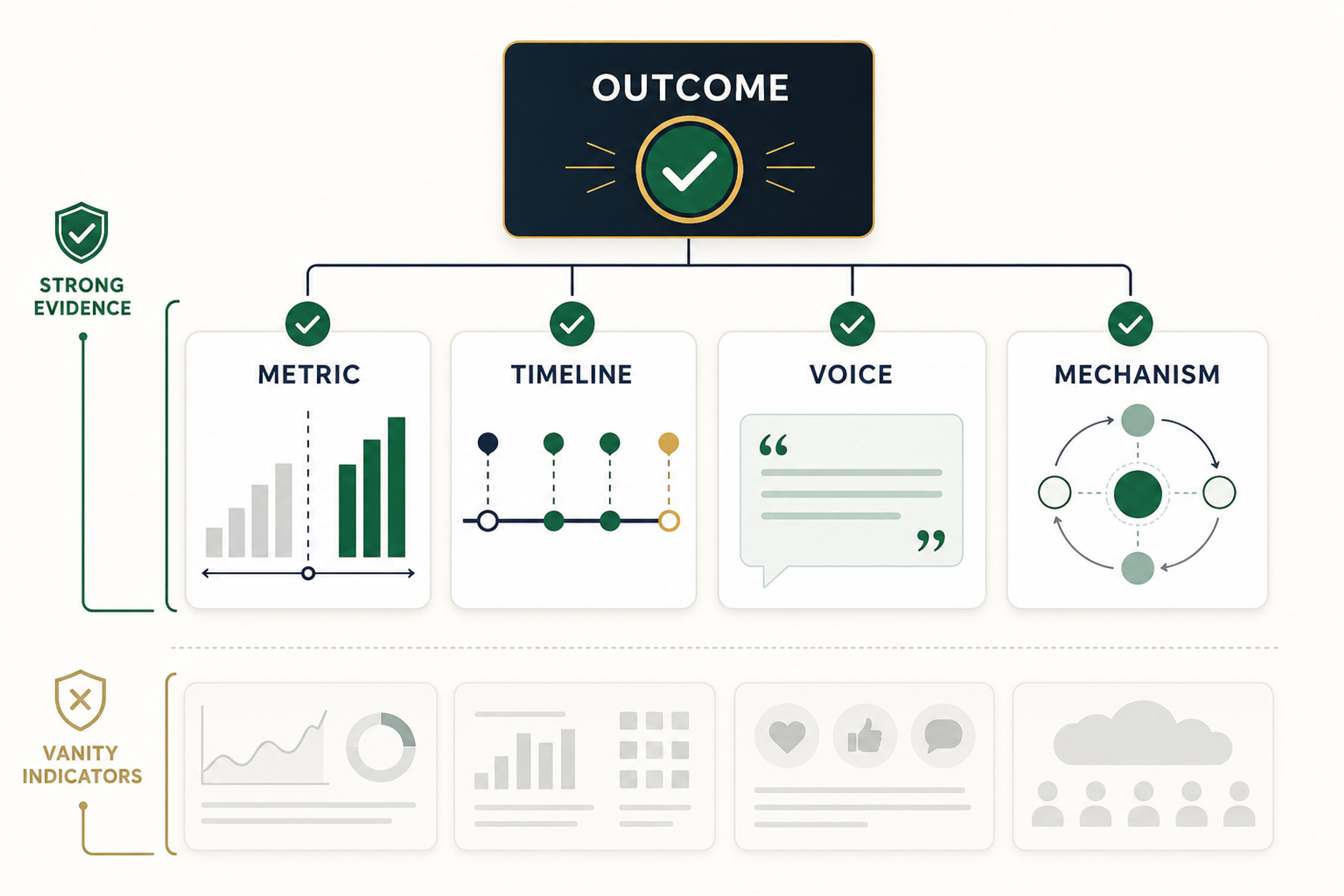
Quatro tipos de evidência funcionam especialmente bem juntos:
Mostre a medida mais próxima do resultado prometido: conversão, tempo de conclusão, taxa de defeitos, retenção, resultado de aprendizagem, custo, adoção, receita ou outro resultado definido. Inclua a linha de base, período de comparação, unidade, população e prazo.
Mostre quando as intervenções ocorreram e se o padrão mudou depois. Um cronograma não pode provar causalidade por si só, mas ajuda o público a entender a sequência e a descartar narrativas vagas.
Uma citação pode explicar experiência, atrito ou valor percebido que uma métrica não captura. Use uma citação real e aprovada com contexto significativo. Não permita que uma citação positiva substitua a evidência de resultado.
Explique por que a abordagem deveria ter produzido o resultado observado. Isso pode ser um processo mais curto, um novo comportamento, correspondência aprimorada, variação reduzida, um incentivo mais claro ou melhor informação em um ponto de decisão.
Evite construir o caso em torno de indicadores de vaidade que estão distantes do resultado. Impressões, participação, visualizações de página, arquivos criados ou workshops concluídos podem descrever atividade, mas não provam automaticamente o impacto nos negócios ou no usuário.
O slide de resultados deve responder a quatro perguntas:
Use uma linguagem que corresponda ao design. Um experimento randomizado pode apoiar uma afirmação causal. Um caso operacional de antes e depois geralmente apoia uma declaração mais limitada: o resultado seguiu a intervenção e é consistente com o mecanismo proposto. O deck pode ser comercialmente confiante sem fingir que a evidência é mais forte do que realmente é.
Quando vários resultados importam, escolha um resultado principal e mostre os benefícios secundários abaixo dele. Se cada métrica receber o mesmo peso visual, o público não conseguirá discernir o que significa sucesso.
Uma citação merece um slide quando cumpre uma das três funções:
Mantenha contexto suficiente para interpretar a citação: função, relação com o caso e quando foi coletada. Obtenha aprovação para uso voltado ao cliente. Se a atribuição precisar ser anônima, descreva a função honestamente, em vez de inventar um nome ou retrato.
Elogios genéricos — “A equipe foi ótima para trabalhar” — raramente impulsionam o caso. Uma citação útil contém informações: o que se tornou mais fácil, qual objeção foi resolvida ou o que as pessoas agora podem fazer que não podiam antes.
O caso original pode suportar vários decks, mas cada um deve fazer uma seleção diferente.
Comece com o problema do cliente, o resultado, a velocidade de valorização e evidências de que o resultado é relevante para um comprador semelhante. Termine com um próximo passo claro.
Comece com a relevância estratégica, decisão, retorno, risco e repetibilidade. Mantenha os detalhes de implementação no nível necessário para aprovar escala ou investimento.
Mostre a lógica diagnóstica, alternativas, recomendação, evidências e implicações. Deixe claro quais descobertas vêm da análise e quais são escolhas da gestão.
Deixe seu próprio papel explícito. Separe a atividade da equipe de suas decisões, artefatos e contribuição. Discuta as restrições e o que você mudaria.
Enquadre a decisão, forneça evidências em etapas e abra espaço para interpretações concorrentes. O objetivo de aprendizagem importa mais do que promover a solução final.
Se o caso já existe como um documento, relatório ou história de cliente, o fluxo de trabalho de estudo de caso para PPT do SlidesPilot pode transformá-lo em um rascunho de apresentação editável.
Use este processo:
Um prompt focado poderia ser:
Transforme este estudo de caso em uma apresentação de nove slides para clientes em potencial na mesma indústria. Comece com o resultado mensurável, explique o problema operacional original, mostre a decisão e a intervenção em três partes, e apoie o resultado com a linha de base aprovada, o prazo e a citação do cliente. Termine com a lição que uma organização semelhante pode aplicar. Não invente métricas, citações, datas ou detalhes do cliente.
A instrução importante não é “faça isso parecer profissional”. É o resumo narrativo e de evidências. O polimento visual não pode salvar uma afirmação pouco clara.
As diretrizes de apresentação da Microsoft recomendam texto simples, tipo legível, alto contraste e visuais que transmitam a mensagem sem sobrecarregar o público. Para um estudo de caso, traduza isso em várias regras práticas:
A fotografia pode estabelecer contexto, mas não deve substituir a evidência. Fotos genéricas de escritório e apertos de mão fazem um caso parecer menos específico. Prefira visuais reais de produto, processo, cliente, ambiente ou resultado quando houver permissão.
Uma longa introdução da empresa atrasa o problema. Forneça apenas o contexto necessário para entender os riscos.
Workshops e entregáveis são entradas. Mostre o que eles mudaram no processo, decisão, produto ou comportamento.
“Engajamento melhorado” não é evidência. Defina a medida, comparação, público e período.
Explique o que o design suporta. Um storytelling comercial forte e um raciocínio cuidadoso podem coexistir.
Selecione uma citação que explique o problema, o mecanismo ou o valor — não apenas a aprovação.
O público deve saber o que este caso significa para eles. Declare o princípio, a recomendação ou o próximo passo.
Antes que o deck esteja pronto, confirme que:
Um caso focado no cliente ou em vendas geralmente funciona em 7 a 10 slides. Um caso de consultoria, acadêmico ou de portfólio pode exigir mais análise e um apêndice. Use apenas slides suficientes para estabelecer contexto, decisão, abordagem, evidência, resultado e lição.
Quando o resultado é conhecido e relevante, use um título focado no resultado. Para um caso de decisão em sala de aula, enquadre a situação e a decisão sem revelar o resultado muito cedo.
Escolha a medida mais próxima do resultado prometido. Adicione evidências de processo, adoção, qualidade ou experiência apenas quando elas ajudarem a explicar o resultado.
Sim, especialmente para trabalhos exploratórios, de design, organizacionais ou qualitativos. Use observações credíveis, evidências de participantes, artefatos, mudanças de processo e raciocínio analítico claro. Seja preciso sobre o que a evidência demonstra.
Sim. A IA pode extrair a narrativa e construir um primeiro rascunho editável a partir de um caso escrito. Forneça a ela o público, a transformação, as evidências aprovadas e os limites necessários, e então verifique cada afirmação factual em relação à fonte.
Uma apresentação de caso memorável não é memorável por ser dramática. É memorável porque o público pode seguir a cadeia do problema à decisão, da decisão à ação e da ação à evidência. Quando essa cadeia é clara, o caso se torna mais do que uma história de sucesso: ele se torna um modelo útil para a próxima decisão.
Transforme estudos de caso detalhados em apresentações profissionais de PowerPoint
Transforme documentos Word em apresentações PowerPoint claras, estruturadas e editáveis com IA.
Transforme uma ideia em uma apresentação completa e estruturada. Defina o público e o objetivo, guie o tom e a duração, e deixe SlidesPilot construir a narrativa, o plano de slides, o conteúdo e a direção visual.
Guias práticos para transformar documentos, ideias, pesquisas e conteúdo da web em apresentações melhores com IA.
Faça o upload da fonte, escolha o público e deixe o SlidesPilot construir um deck de estudo de caso editável com uma história clara do problema ao resultado.
