
Screenshot to Editable PowerPoint
Turn presentation screenshots, dashboards, reports, and captured slide designs into editable PowerPoint slides.
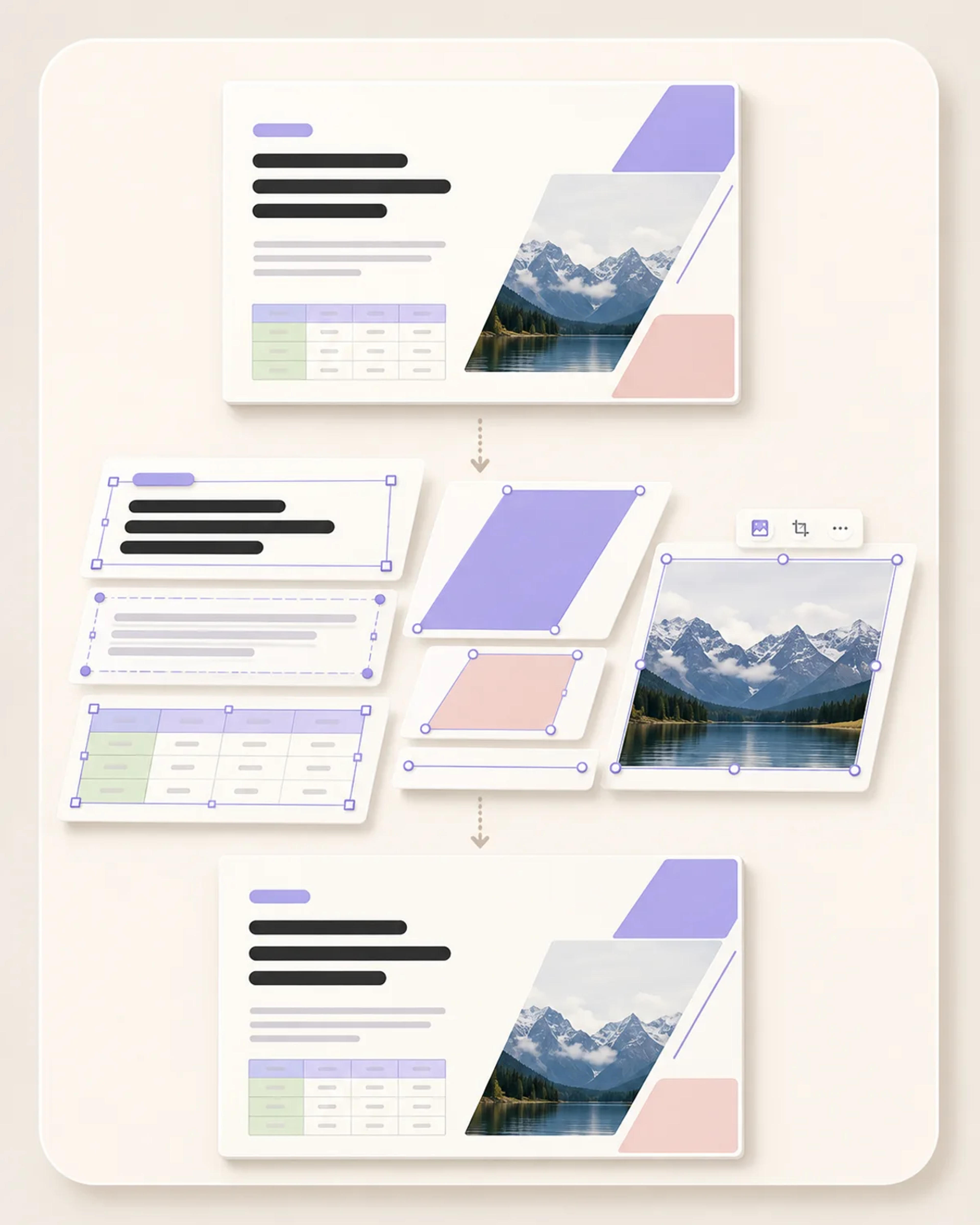
Convert up to 50 PNG, JPG, or WebP images into one editable PowerPoint. SlidesPilot reconstructs text, shapes, tables, and images while preserving the original layout.
Drag and drop your screenshots or slide images, or choose files to upload.
SlidesPilot understands the visual structure of every image and rebuilds it as a PowerPoint you can edit, adapt, and reuse.
Select and update the individual objects inside each reconstructed slide, from wording and graphic elements to tables and imagery.
Preserve the original page ratio, composition, spacing, and visual hierarchy while gaining full editing control in PowerPoint.
Upload an entire image sequence and receive one organized PowerPoint file, with every image rebuilt as its own editable slide.
Every image workflow
Use one converter for individual images, screenshot-based slides, and complete image sequences—without rebuilding the presentation by hand.
Turn presentation screenshots, dashboards, reports, and captured slide designs into editable PowerPoint slides.
Convert JPG and JPEG slide images into a PowerPoint with editable text, shapes, tables, images, and layout.
Upload crisp PNG screenshots or exported slide pages and continue editing their content in PowerPoint.
Bring WebP graphics and image-based slides into an editable PPTX while preserving their original structure.
Upload as many as 50 images in one conversion and keep the entire sequence together in one presentation.
Make text that was trapped inside an image selectable and editable, then update wording, fonts, colors, and placement.
Go from fixed screenshots or image files to one editable PPTX in four simple steps.
Add one image or upload up to 50 PNG, JPG, or WebP files in the order you want them to appear.
SlidesPilot recognizes text, shapes, tables, images, and the visual structure of every page.
The converter preserves the source page ratio and layout while rebuilding the content as editable PowerPoint objects.
Get all uploaded images combined into one PowerPoint and continue editing in Microsoft PowerPoint.
Keep the design you already have and gain the flexibility to update, reuse, and present every slide as a native PowerPoint deck.
Correct typos, rewrite headlines, revise labels, and replace outdated information directly inside the slide.
Adjust fonts, colors, imagery, and visual elements to match your company, client, class, or event.
Edit table labels and values so image-based reports and dashboards stay current and presentation-ready.
Move, resize, and organize extracted text, shapes, tables, and images while retaining the original composition as your foundation.
Turn visual references and finished slide artwork into an editable starting point for new decks, campaigns, lessons, and reports.
Download a real PPTX and keep working in the familiar Microsoft PowerPoint workflow your team already uses.
From client updates to classroom reuse, editable PowerPoint output helps people keep the design and continue the work.
Everything you need to convert screenshots and image files into editable PowerPoint slides.
Upload your PNG, JPG, or WebP images to SlidesPilot. Our AI recognizes the original text, shapes, tables, images, ratio, and layout, then rebuilds them as editable slides and delivers one downloadable PPTX.
Yes. Upload a screenshot and SlidesPilot converts its visual content into editable PowerPoint objects while preserving the original page ratio and layout.
Yes. SlidesPilot extracts text from the image and turns it into selectable PowerPoint text boxes, ready for rewriting, formatting, moving, and resizing.
SlidesPilot reconstructs text, shapes, tables, and images as editable PowerPoint content, giving you direct control over the elements that make up the slide.
Yes. SlidesPilot preserves the original page ratio and layout, including the overall composition, spacing, and visual hierarchy of the source image.
You can upload PNG, JPG, JPEG, and WebP image files. Each image can be up to 10MB.
You can upload up to 50 images in one conversion. SlidesPilot combines all of them into a single PPTX, with one editable slide created from each image.
Yes. SlidesPilot's image to editable PowerPoint converter is free to use, so you can turn screenshots and image files into an editable PPTX online.
Yes. Your uploaded documents and images are protected and remain private. SlidesPilot does not use your files to train AI models.
Yes. Download the result as a PPTX and open it in Microsoft PowerPoint to edit text, shapes, tables, images, styling, and slide layouts.
Continue from NotebookLM slides, convert documents, polish an existing deck, or move your presentation into Google Slides.
Upload a NotebookLM PDF or image-based PPTX. Our proprietary AI extracts the original text and slide elements while preserving the content, layout, and visual design in an editable PowerPoint.
Convert PDF slides to editable PowerPoint online. Keep the original design and make text and slide elements editable. Free to use.
Transform plain PowerPoint presentations into professional designs using AI
Upload a PPT or PPTX and get a native, fully editable Google Slides link—ready to open, share, present, and copy to your own Google Drive.
Upload screenshots, JPG, PNG, or WebP files. SlidesPilot reconstructs the original content and layout, combines up to 50 images, and gives you one editable PPTX ready for real work.