

AI PowerPoint Creation Is No Longer a Desktop Job: Meet the SlidesPilot Mobile App
Turn PDFs, Word files, links, text, or a prompt into editable presentations on iPhone and Android—then continue on the web with the same SlidesPilot account.
Turn PDFs, Word files, links, text, or a prompt into editable presentations on iPhone and Android—then continue on the web with the same SlidesPilot account.
SlidesPilot Mobile brings a complete AI PowerPoint workflow to iPhone and Android, turning the device already in your hand into a presentation workspace.
You can turn a PDF, Word document, PPTX file, webpage, YouTube link, pasted text, notes, outline, or a simple idea into a structured, editable presentation. Choose a professional theme, refine the result, and export it as PowerPoint, Google Slides, PDF, images, or a shareable link—without waiting until you are back at a desk.
This is more than another screen for SlidesPilot. It is a response to one of the clearest shifts we have seen in how people create presentations.
SlidesPilot's first-party product data shows a 60:40 split between desktop and mobile.
Desktop accounts for 60% of users. Mobile represents the other 40%: 20% use SlidesPilot through the mobile web, and another 20% use the mobile app. This makes mobile a major AI presentation channel—not a secondary or experimental one.
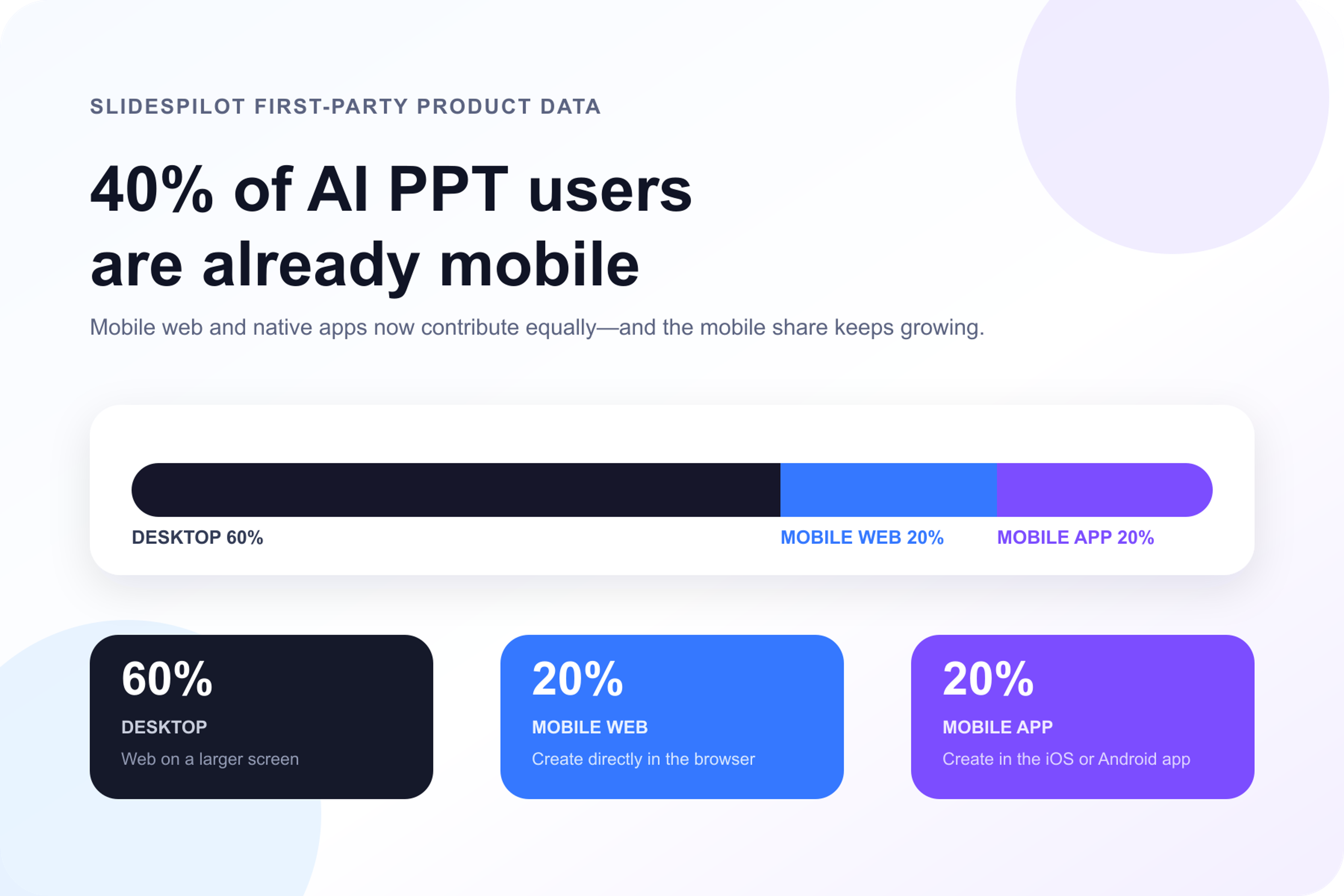
That number changes the conversation. Mobile is not a secondary presentation channel. It is where a significant share of AI presentation work begins.
People receive reports on their phones. They open research links between meetings. They capture ideas on the train. Students read assignments in messaging apps. Sales teams get client material minutes before a call. Teachers save articles and videos whenever they find something worth explaining.
The presentation request rarely arrives at the exact moment someone is sitting in front of a laptop. The best time to start a presentation is when the source, request, or idea reaches you.
Presentation work does not begin when someone opens PowerPoint. It begins when a document arrives, an idea appears, or a meeting ends.
That is why we believe mobile is the future of AI presentation creation—and why SlidesPilot is treating it as a core product, not a side project.
SlidesPilot Mobile gives people a direct path from source material to a finished presentation. The workflow starts with whatever is already in front of you:
Instead of starting from an empty slide, you start from the knowledge, source, or idea that matters. SlidesPilot reads the input, identifies the main points, builds a logical slide flow, writes presentation-ready content, and applies a professional visual direction.
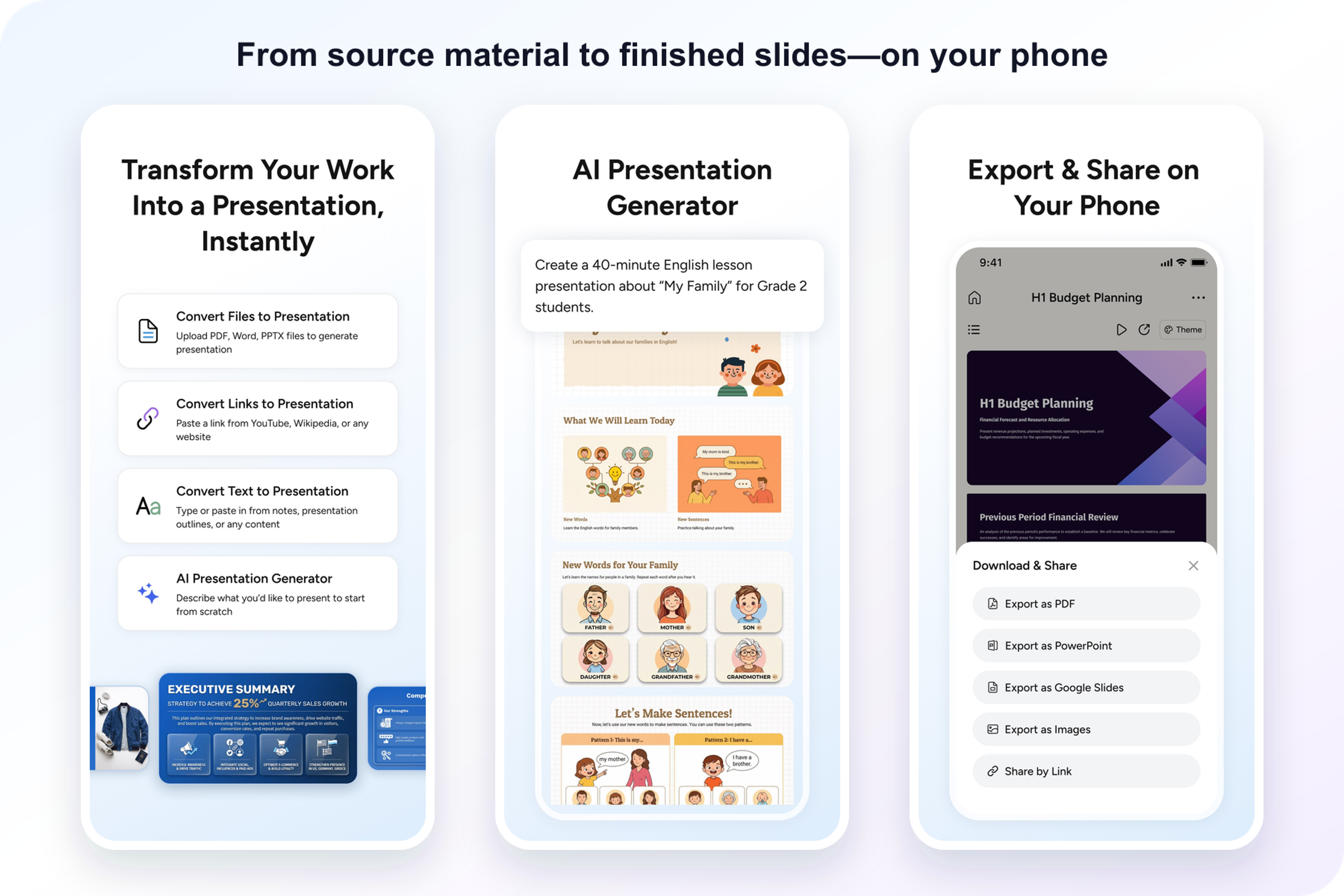
The result is a real presentation you can review, refine, export, and share. It is an AI presentation maker designed around completing the job, not simply producing an outline that still has to be rebuilt somewhere else.
A phone changes what speed means. The goal is not to reproduce every desktop interaction on a smaller screen. The goal is to remove the distance between receiving information and turning it into something ready to present.
Open SlidesPilot and choose the source that fits the moment. Upload a file, paste a link, add text, or describe the presentation you want. There is no blank-slide barrier and no need to transfer the material to another device first.
A board update, classroom lesson, sales proposal, research briefing, and training deck should not tell the same story. Tell SlidesPilot who the presentation is for and what it needs to accomplish. The AI shapes the structure, language, and level of detail around that purpose.
Select a look for business, education, consulting, marketing, academic work, sales, or another presentation setting. SlidesPilot brings the content and visual direction together so the deck feels ready for its audience.
Download the finished work as PowerPoint, Google Slides, PDF, or images, or send a shareable link directly from the app. When you want more room to continue editing, the same presentation is ready in the SlidesPilot web experience.
This is what an end-to-end mobile AI presentation workflow should feel like: the source goes in, the story takes shape, the slides become presentable, and the result moves wherever the work needs to go.
Mobile does not replace the desktop. It makes the entire presentation workflow more flexible.
Start a deck on your phone the moment a document arrives. Continue on the web when you want a larger canvas. Return to mobile when you need to share, export, or make progress away from your desk. Your SlidesPilot account and membership work across the web, iOS, and Android.
The right device is simply the one already in front of you.
This cross-screen continuity matters because presentation work is rarely one uninterrupted session. It happens in pieces: an idea captured in the morning, a report received at lunch, feedback added in the afternoon, and a final deck shared before a meeting. SlidesPilot keeps those moments inside one AI presentation workflow.
Many presentation apps began as desktop tools and later added a smaller companion experience. The phone became a place to view a finished deck, read comments, or make a last-minute change. Useful—but far short of what mobile users expect from AI.
SlidesPilot treats creation as the starting point. The app is designed for the moments when the source arrives on your phone and the presentation needs to begin immediately. That means serious support for document input, link input, AI generation, professional themes, multilingual creation, editable output, PowerPoint-compatible workflows, and cross-device continuity.
SlidesPilot's 60:40 desktop-to-mobile split makes mobile a product direction, not a secondary interface.
SlidesPilot Mobile is our commitment to that direction.
The value of mobile AI PowerPoint creation becomes clearest in real moments:
SlidesPilot supports presentation creation in 100+ languages, helping the same mobile workflow serve global teams, classrooms, and audiences. More than 3 million creators already use SlidesPilot across web and mobile, and the mobile apps have passed 200,000 combined downloads.
AI changed the first draft of presentation creation. Mobile changes when and where that first draft can happen.
Together, they remove one of the oldest constraints in presentation work: the idea that making a serious deck requires sitting at a desk, opening a blank file, and setting aside a large block of time.
The next generation of presentation software will not be defined by a single screen. It will move with the user, understand the source wherever it appears, and turn that source into a useful visual story before the moment passes.
SlidesPilot is building for that future: one AI PowerPoint workflow across web, iPhone, and Android.
Visit the SlidesPilot Mobile page, download SlidesPilot for iPhone, or get SlidesPilot on Google Play.
Turn the document you just received, the link you just opened, the notes you just captured, or the idea you just had into a presentation—directly from your phone.
Making a PPT on your phone? Use SlidesPilot.
Create presentations 10X faster on your phone. Turn PDFs, Word files, links, text, or a prompt into editable slides with the SlidesPilot AI presentation app.
Convert PDF slides to editable PowerPoint online. Keep the original design and make text and slide elements editable. Free to use.
Turn Word documents into clear, structured, editable PowerPoint presentations with AI.
Paste a content-rich link and turn the online source into a clear, editable PowerPoint presentation.
Turn an idea into a complete, structured presentation. Define the audience and goal, guide the tone and length, and let SlidesPilot build the storyline, slide plan, content, and visual direction.
Turn files, links, text, or a prompt into an editable presentation wherever you are.
Trusted by 3 million creators • 200,000+ mobile downloads


