

20 Icebreaker Games for Meetings, Teams, and Classrooms
Find a game your group can start quickly, follow its rules and prompts, and use a complete five-slide example to put the activity on screen.
Find a game your group can start quickly, follow its rules and prompts, and use a complete five-slide example to put the activity on screen.
Icebreaker games give a group a shared task before the main meeting, workshop, or lesson begins. A simple choice, a short puzzle, or a paired conversation lets people take part before they have to discuss something more demanding.
For a five-minute meeting opener, start with This or That. For new colleagues in a small group, try Two Truths and a Lie or Three Things in Common. For a larger room, use Human Bingo within table groups so people can talk without waiting for a turn at the microphone.
The 20 games below include rules, example prompts, and ways to adapt them. You can run most with spoken instructions; a few clear slides help when the room needs to see the same question or remember a sequence.
Each game below includes its suggested group size, time, materials, and setting. The times are planning estimates. When everyone needs a speaking turn, use pairs or small groups to keep the activity within your opening slot.
For meeting icebreakers, choose a prompt people can answer without specialist knowledge. In a classroom, make the task understandable before asking students to perform it. For either audience, give a brief example and let people pass.
Group: any size. Time: 3–5 minutes. Materials: none. Setting: room or video call.
Give everyone the same easy choice so the whole group can answer together. This is a useful opener when you want participation without a round of introductions.
Try ‘learn by watching or learn by doing?’ before a training session. Treat the answers as conversation starters, not fixed personality types.
Group: 4–20. Time: 2–3 minutes. Materials: none. Setting: room or video call.
Use a single word to give everyone a speaking turn before the main discussion. Keep the question focused on the session rather than asking people to explain their private lives.
If ‘clarity’ appears several times, name the decision or question the meeting will clarify. Accept a pass without asking for an explanation.
Group: 4–30. Time: 3–5 minutes. Materials: chat or a shared screen. Setting: room or video call.
Ask the group to describe the task ahead with an emoji. A picture gives people something concrete to react to and makes a short check-in easy to display.
For example, ‘I chose the puzzle piece because we have the information but haven’t connected it yet.’ A spoken or typed word works equally well.
Group: 4–20. Time: 4–6 minutes. Materials: two or three prompts. Setting: room or video call.
Offer an imaginary tradeoff and let people explain their reasoning. Unlike a simple preference poll, the fun comes from having to choose between two appealing or inconvenient possibilities.
Keep the choices separate from salary, health, relationships, and other topics people may prefer not to discuss. The game needs an interesting decision, not an uncomfortable disclosure.
Group: 4–8. Time: 5–8 minutes. Materials: an ordinary nearby object. Setting: room or video call.
Give introductions a visible starting point. Each person chooses a nearby object and uses it to explain something about how they work, study, or approach a task.
A paper clip might represent connecting ideas; a notebook might represent writing questions down first. In a bigger group, do the sharing in pairs instead of extending the full-room round.
Turn your chosen game into editable slides with clear rules, example prompts, and instructions tailored to your group.
Create My Icebreaker SlidesGroup: 4–6 per group. Time: 8–10 minutes. Materials: paper or chat, optional. Setting: room or video call.
Each person shares three statements, and the group guesses which one is invented. Use everyday interests or preferences so nobody needs an extraordinary life story to take part.
A simple set could concern enjoying a particular food, keeping houseplants, and finishing a jigsaw puzzle. For a larger meeting, use groups of four to six and bring back one interesting discovery per group.
Group: 3–5 per group. Time: 5–7 minutes. Materials: paper or a shared note. Setting: room or breakout rooms.
Small groups look for shared interests that are less obvious than attending the same meeting. This gives people a reason to ask follow-up questions instead of reciting job titles.
Shared interests might include enjoying train journeys, making lists on paper, or preferring to learn with an example. Accept an ordinary connection; the point is the conversation that finds it.
Group: 3–6 per team. Time: 6–8 minutes. Materials: paper or a shared slide. Setting: room or breakout rooms.
Give temporary workshop teams a shared identity they can use throughout the session. A clear constraint keeps the task short and gives everyone a way to contribute.
For a planning workshop, a motto might be ‘Ask first, then draw the map.’ Let teams decide together rather than selecting a leader to speak for them before they have talked.
Group: 3–6 per group. Time: 5–7 minutes. Materials: three object names per round. Setting: room or video call.
Challenge a small group to connect three ordinary objects. Several answers can work, which makes the conversation about explaining an idea rather than finding the host’s secret answer.
Close by asking which connection surprised the group. For a class, choose vocabulary from the current topic; for colleagues, use familiar objects without specialist knowledge.
Group: 6–24. Time: 6–8 minutes. Materials: two conversation prompts. Setting: room or breakout rooms.
A short paired conversation gives people a manageable way to meet someone before speaking to the whole group. Two rounds are enough to create a few familiar faces.
On a video call, use assigned breakout pairs and show the prompt before opening the rooms. With an odd number, make one group of three and give it a little more time.
Group: 8–30. Time: 8–12 minutes. Materials: a nine-square card and pen. Setting: room; chat adaptation possible.
Human Bingo, also called icebreaker bingo, gives people a clear reason to start conversations. Each square contains a neutral prompt, and players find someone who matches it.
For a large event, run the game within table groups or sections of the room. Online, display the card and let people volunteer a square in chat before pairing up to talk.
Create a three-by-three card with one of these prompts in each square, or replace them with prompts that suit your group:
The card gives people a starting question. A short follow-up—“Which book would you recommend?”—turns a match into a conversation.
Group: 6–20 per group. Time: 5–7 minutes. Materials: none. Setting: room or typed chat.
Ask a group to arrange itself in an order without speaking. Use an observable or fictional category so the challenge stays playful and easy to understand.
For remote groups, let participants type their chosen character and work together to post an ordered list. In a very large room, give each table its own sort rather than asking everyone to move.
Group: 4–8 per team. Time: 5–7 minutes. Materials: paper or a shared note. Setting: room or breakout rooms.
Teams create an alphabet list around one broad theme. The shared task gives people something to discuss immediately and makes it easy to hear several different ideas.
For example, ‘apron’ fills A and ‘bowl’ fills B. In a class, use a topic students already know; avoid turning an introduction into a test of material they have not learned.
Group: 4–8 per team. Time: 6–8 minutes. Materials: prepared object prompts. Setting: room or video call.
One person describes an everyday object with three clues, and teammates try to identify it. The game gives everyone a short, defined role without requiring a performance.
For larger groups, run the same prompt simultaneously at separate tables and compare the clues afterward. A remote host can send the word privately or let the clue-giver select an object.
Group: 4–8 per group. Time: 5–7 minutes. Materials: a starting sentence. Setting: room or video call.
Build a short story one sentence at a time. A shared starting point helps students contribute without needing to invent an entire story or talk about themselves.
Set the topic and expected tone before starting. On a call, establish the speaking order; in chat, name the next contributor so several endings do not arrive at once.
Group: 4–30. Time: 5–7 minutes. Materials: paper and pen. Setting: room or video call.
A deliberately quick drawing gives the group something to share and discuss. Choose an imaginative prompt so drawing skill matters less than the idea behind the picture.
Someone might add wheels for moving between distant classrooms or a tiny greenhouse for a plant-care lesson. Offer a written description as an equally valid way to contribute.
Group: 4–8 per group. Time: 5–7 minutes. Materials: one ordinary object. Setting: room or video call.
Ask people to imagine a new use for a familiar object. The object anchors the task, while the one-sentence format keeps answers short enough for everyone to join.
A cardboard tube could become a seedling guard, a miniature tunnel, or a pretend telescope. Online, show one object on camera or describe it clearly in chat.
Group: 4–30. Time: 5–7 minutes. Materials: one simple picture. Setting: room or video call.
Use a picture to start a short exchange between partners. This gives students a shared subject and encourages them to listen to another interpretation.
Describe the image aloud before discussion. A short written scene can replace the picture, so the activity still works when people cannot see the shared screen clearly.
Group: 4–20. Time: 5–7 minutes. Materials: three neutral prompts. Setting: video call or room.
Use nearby objects as quick prompts without asking people to show their homes. Participants can hold up an item, name it, or describe it in chat.
Keep the camera optional and ask for objects rather than personal documents or screens. In a large call, take responses in chat and read a small selection rather than waiting for every person to speak.
Group: 3–6 per team. Time: 5–8 minutes. Materials: three questions and answers. Setting: room or video call.
A tiny team quiz gives people a shared problem to solve. Use a few approachable questions and let teammates discuss each answer before reporting it.
Choose a mix of topics so one specialist does not answer everything. For a classroom version, use familiar lesson material; SlidesPilot’s AI Quiz Generator can turn a topic or teaching material into question-and-answer slides.
Slides are useful when you want the same instructions and prompts visible to everyone. Keep the deck focused on what participants need to do; your spoken introduction can provide the rest.
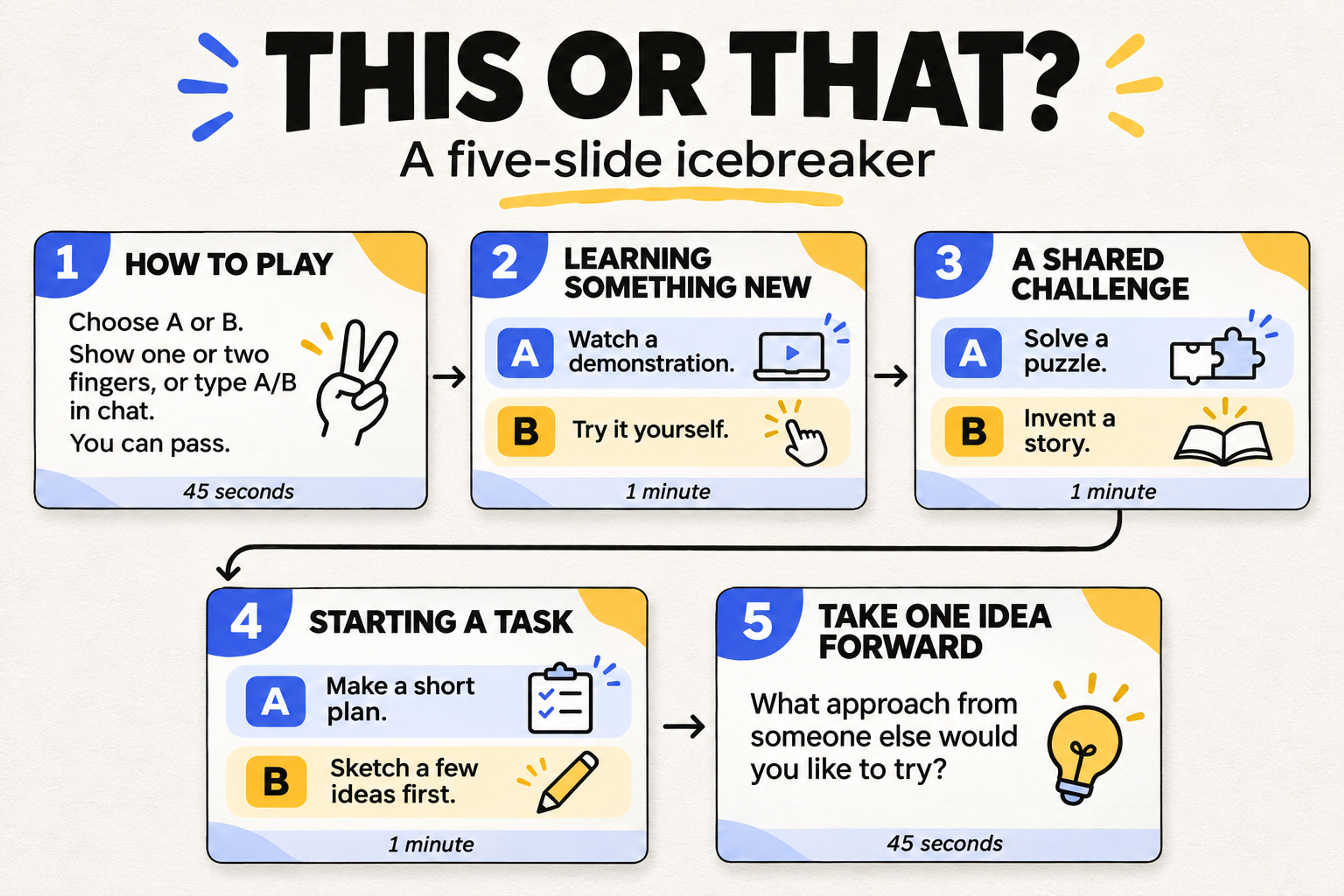
Here is a complete five-slide outline for a ten-person hybrid team playing This or That. It uses three neutral prompts and leaves room for a short explanation from volunteers.
On screen: “Choose A or B. Show one or two fingers, or type A/B in chat. You can pass.”
Model a quick answer and explain that reasons are optional. Allow 45 seconds.
On screen: “A: Watch a demonstration. B: Try it yourself.”
Take the choices together, then hear one sentence from two volunteers. Allow one minute.
On screen: “A: Solve a puzzle. B: Invent a story.”
Invite someone who has not spoken to explain a choice. Allow one minute.
On screen: “A: Make a short plan. B: Sketch a few ideas first.”
Hear two different approaches without deciding which is better. Allow one minute.
On screen: “What approach from someone else would you like to try?”
Take two responses and connect the activity to the session. Allow 45 seconds.
The outline takes four and a half minutes, leaving about 30 seconds for transitions. Display the prompt while people answer, and advance when the round is complete.
To turn the outline into a deck, open SlidesPilot’s AI Presentation Generator, describe the group and purpose, and paste the slide content. If your rules and prompts are already written, you can also use the text-to-PowerPoint workflow.
Use this prompt as a starting point:
Create five editable slides for a ten-person hybrid team’s five-minute This or That icebreaker. Use one rules slide, the three A/B prompts in this outline, and one closing question. Give each slide one clear task, large readable text, and a brief host cue. Participants answer aloud or in meeting chat, and anyone can pass.
Keep one prompt on each activity slide. Use the same A/B layout throughout so participants can concentrate on their choice instead of learning a new format every round.
Before starting, tell the group three things: what they will do, how they will respond, and when the round ends. Show one example instead of giving a long explanation.
For a ten-person call, that might sound like: “We’ll answer three A/B questions. Type your choice in chat, then I’ll ask for two volunteers to explain. We’ll finish in five minutes, and you can pass on any question.”
Keep these practical details ready:
This or That, One-Word Check-In, and Emoji Forecast all fit a short opening. Use two or three prompts, collect responses together, and invite only a few explanations. A full introduction round takes longer as the group grows.
This or That, Would You Rather, Three Things in Common, and Story Chain can all run with spoken instructions. On a video call, meeting chat gives people another way to contribute.
Use a simultaneous response game such as This or That, or divide the room into smaller groups for Human Bingo, Team A-to-Z, or Three-Clue Guess. Set the same rules for each group and bring back a small selection of responses.
Story Chain, One-Minute Doodle, Mystery Object, and Picture Prompt give students a concrete task before asking them to speak. Choose familiar topics and demonstrate the expected length of an answer. For younger students, read each instruction aloud and use a shorter round.
An icebreaker question asks for an answer. A game adds a shared rule or task, such as guessing a statement, finding a match, or building a story. A game does not need a winner: taking turns and completing a shared task can provide enough structure.
Yes. Put the rules, a worked example, and the prompts on separate slides. The facilitator runs the turns and collects answers through the response method chosen for the session. For a short quiz, use question slides followed by answer slides.
Bring your game outline to SlidesPilot and build an editable presentation for your next meeting, workshop, or class.