

Quarterly Business Review (QBR) Deck: A Slide-by-Slide Guide
Plan a quarterly business review around the decisions that matter, using a ten-slide structure, a fictional worked example, and a copyable outline.
Plan a quarterly business review around the decisions that matter, using a ten-slide structure, a fictional worked example, and a copyable outline.
A quarterly business review (QBR) deck explains what happened during the quarter, what the results mean, and what the team or customer should do next. Build it around a clear sequence: goals, performance, drivers, value delivered, risks, and an agreed action plan.
The most useful slides connect evidence to a decision. A chart showing slower onboarding becomes more valuable when it explains which step caused the delay and who will fix it next quarter.
This guide gives you a practical QBR presentation structure, a fictional worked example, and a copyable outline you can adapt for a customer meeting or an internal review.
A quarterly business review is a recurring conversation about progress against business goals and priorities for the coming quarter. The QBR deck is the presentation that supports that conversation. It brings the relevant results, explanations, and proposed actions into one place.
Start by deciding whose decisions the meeting should support. A customer success manager might use a QBR to discuss adoption and value with a client. A department leader might use it to explain performance and request resources. Both need evidence, but they need different stories.
| Review type | Main audience question | What to emphasize |
|---|---|---|
| Customer QBR | Are we making progress toward our business goals together? | Agreed outcomes, adoption, value, unresolved obstacles, joint commitments |
| Internal business review | What should we change or prioritize next quarter? | Targets, performance drivers, capacity, risks, resource decisions |
For a customer-facing review, organize the narrative around the customer's objectives. For an internal review, connect team performance to the decisions leadership can make. Choose one audience before building the slides.
Collect the previous quarter's objectives, actual results, comparison period, explanations from the people doing the work, and outstanding commitments. Record the source and reporting period beside each metric so the same definition carries through the presentation.
Give each proposed slide a short working note: result, evidence, implication, decision. If a metric has no bearing on the audience's goals or next steps, move it to supporting material.
Use a small scorecard to establish the facts. The following numbers describe a fictional customer onboarding program; they are illustrative, not a benchmark or a SlidesPilot customer result.
| Measure | Previous quarter | Current quarter | Current target | Interpretation |
|---|---|---|---|---|
| Median time to launch | 24 days | 18 days | 15 days | Faster, with a remaining three-day gap |
| Teams completing onboarding | 12 of 20 | 16 of 20 | 18 of 20 | Broader participation, below target |
| Open launch blockers at quarter end | 8 | 5 | 2 or fewer | Fewer unresolved issues, still above target |
This scorecard supports a specific opening message: “Launch time improved, but unresolved handoffs still stand between us and the target.” The explanation for those handoffs belongs in the next slides.
Use the following ten-slide structure as a starting point. Combine sections when the story is short, and give a complex decision more room when needed. The sequence matters more than a fixed slide count.
Name the account or team, quarter, and purpose of the review. Put the decisions you want from the meeting beside the agenda.
For the onboarding example, the purpose might be: “Review progress toward a 15-day launch and agree on the handoff changes for next quarter.” That gives the audience a reason to engage with the results.
Write the quarter's main message as the slide title. Under it, include the most meaningful improvement, the most important unresolved issue, and the proposed response.
A useful summary for the example is: “Median launch time fell from 24 to 18 days. Five launch blockers remain open. Next quarter, we propose a named owner for every approval handoff.” The supporting slides should explain each statement.
Restate the objectives the audience agreed to, including their measures of success. Show whether each commitment was completed, is in progress, or needs a decision.
Keep the original target visible. If priorities changed during the quarter, explain the change and its effect on the work. This makes the review a continuation of previous commitments.
Present the scorecard using consistent periods, units, and definitions. Show actual performance beside the target so the audience can see both progress and the remaining gap.
In the fictional example, 18 days is an improvement from 24 days and still above the 15-day goal. Both facts belong on the slide. A title such as “Launch time improved by six days; the target gap is three days” captures them directly.
Explain what changed in the work. Use process evidence, customer feedback, or a breakdown of the metric to identify the contributing factors.
Suppose the fictional program's review notes show that a shared intake checklist reduced rework, while approvals still waited between teams. Show those two findings next to the launch-time trend. Describe a proposed explanation as a hypothesis until you have evidence for it.
Connect the operational result to the outcome the audience cares about. Earlier launches might enable teams to begin a planned program sooner. Increased onboarding completion might mean more teams can use an agreed workflow.
Keep the claim aligned with what was measured. A shorter launch cycle supports a statement about elapsed time; a financial return needs its own cost and benefit evidence. Use the customer's language for the outcome and show how the metric relates to it.
For each important issue, state the consequence, response, owner, and point at which a decision is needed. Keep the discussion focused on obstacles that affect the next quarter's goals.
“Approval delays” is too broad to act on. “Launch approvals have no agreed backup owner when the primary reviewer is unavailable” identifies something the team can change.
Select the priorities that follow from the evidence. Explain the expected result and how you will measure it.
In the example, the next priority is to close the handoff gap while keeping the 15-day launch target. That is a clearer continuation of the quarter's findings than adding unrelated initiatives to fill a roadmap slide.
Turn each priority into a commitment with an owner, due date, and success measure. For a customer QBR, make responsibilities on both sides explicit. For an internal review, name the team or role accountable for delivery.
Use concrete verbs: assign, test, document, approve, or launch. “Improve collaboration” needs another step before anyone can own it.
End with the choices the audience needs to make. State the recommendation, the resource or approval required, and when the decision is needed.
Keep this slide open during the discussion. Record agreed changes to the plan and carry them into the next review's commitments. Detailed metric definitions and supporting charts can sit in an appendix for questions.
Here is how the fictional onboarding story can work across three connected slides. Each slide advances the discussion rather than repeating the scorecard.
| Slide | Example headline | Evidence or proposed action |
|---|---|---|
| Performance | Launch time improved, with a three-day gap to target | 24 days previously, 18 days currently, 15-day target |
| Explanation | Intake improved; approval handoffs remain the next focus | Review notes document less intake rework and continuing approval waits |
| Decision | Assign approval owners and test the new handoff process | Operations assigns a primary and backup reviewer; the team measures launch time in the next review |
Notice how the final slide follows from the explanation. The audience can discuss a defined change and the evidence that will show whether it helped.
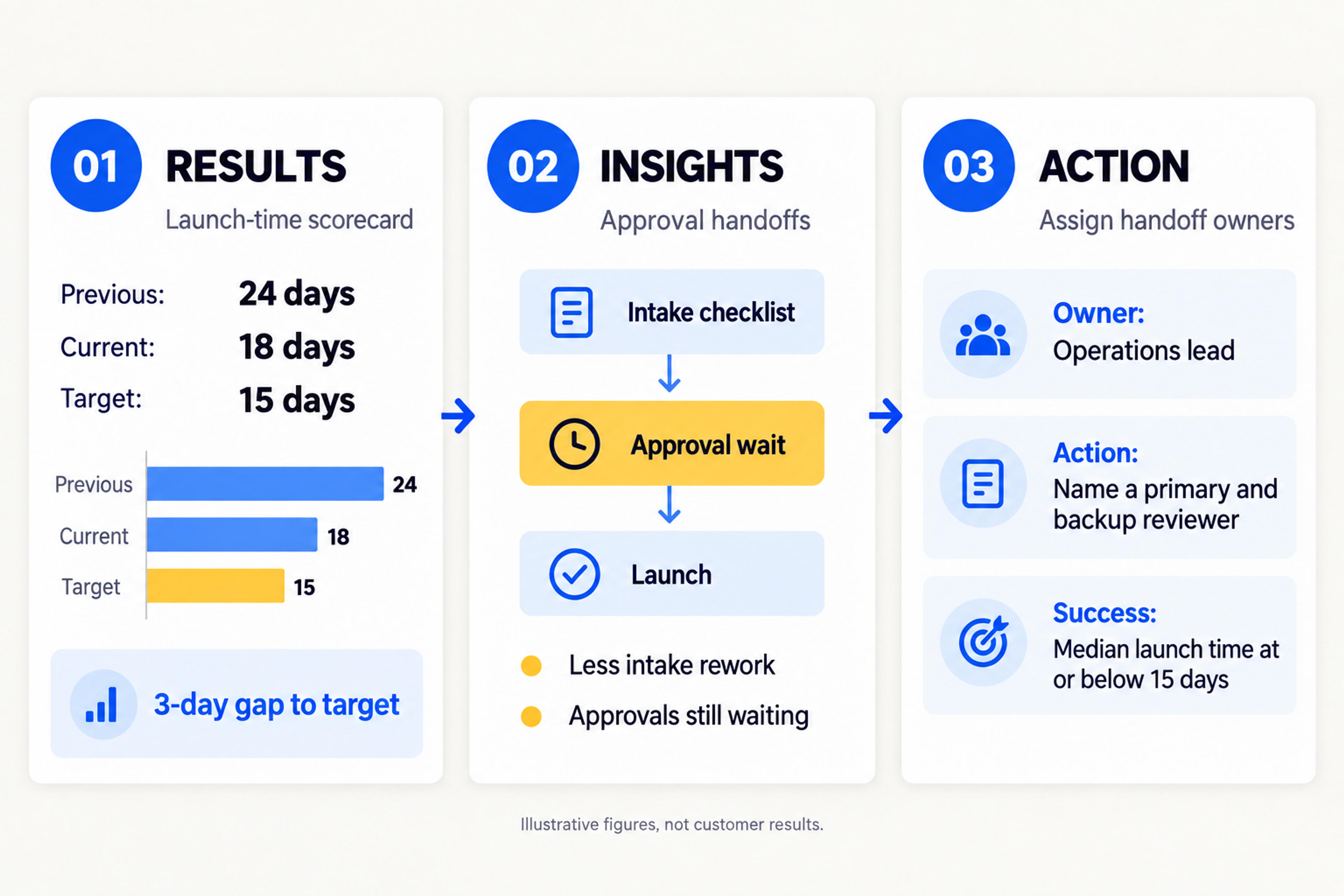
For your own deck, write these connected headlines before designing the slides. Once the narrative is clear, you can turn the notes into a presentation and refine the visuals around it.
Upload it to SlidesPilot and create an editable deck built around results, insights, and next step.
Create My QBR DeckCopy this working outline into your document and fill it with your own evidence. It is a content template for planning the presentation; the prompts tell you what each section needs.
Quarterly business review: [account or team] | [quarter]
Audience: [people attending and the decisions they can make]
Review objective: [what we need to agree by the end]

1. Purpose: [review scope and decisions needed]
2. Executive summary: [main result, issue, and recommendation]
3. Previous goals: [commitments, targets, and current status]
4. Performance: [actuals, targets, comparison periods, sources]
5. Drivers: [evidence explaining wins and misses]
6. Value: [business outcome supported by the results]
7. Risks: [consequence, response, owner, decision needed]
8. Priorities: [next-quarter goals and success measures]
9. Action plan: [action, owner, due date, measure]
10. Decisions: [specific approvals or choices for this meeting]

Appendix: [metric definitions and supporting detail]
To adapt this QBR template for a customer, use the customer's agreed outcomes in the goals and value sections. Include a question about changed priorities before finalizing the next-quarter plan. For an internal review, use the same space to explain tradeoffs in staffing, budget, or delivery capacity.
SlidesPilot's Text to PPT converter turns written notes into an editable presentation. Use the completed outline as your source, together with the results and explanations you want the deck to communicate.
If the source is already a document, use Word to PPT or PDF to PPT to start from the report. Keep your preparation focused on the audience's questions and the decisions the review should produce.
Write headlines that state the takeaway. “Onboarding performance” names a topic; “Launch time improved, but approvals remain the next priority” gives the audience a conclusion to evaluate.
Choose the visual around the question. A trend line helps explain movement across the quarter. A bar chart compares teams or categories. A compact table works well for actual-versus-target results or actions with owners. Label the reporting period and units where the reader can see them.
Give the most important evidence enough space. A slide with several unrelated charts asks the audience to find the story themselves. Split it when the charts support different decisions, and move detailed breakdowns to the appendix.
Before the meeting, read only the slide titles in order. They should explain the quarter's results, why those results matter, and what you recommend next. Then read the action slide separately: every commitment should identify who will do what and by when.
A QBR deck should include the review objective, an executive summary, previous commitments, performance against targets, explanations, value delivered, risks, next-quarter priorities, and an action plan. Close with the decisions you need from the audience.
The ten-slide structure in this guide is a practical starting point. Combine slides when the review is straightforward and add supporting detail where a decision needs explanation. Choose a length that leaves room for discussion within your meeting time.
A status update tracks current work and immediate blockers. A quarterly business review connects results across the quarter to business goals, explains the drivers, and sets priorities for the next period. A QBR can use status information as evidence, then build toward decisions.
Show the actual result beside the agreed target, explain the supported causes, and propose a response with an owner and success measure. Keep meaningful improvements visible too. The onboarding example improved from 24 to 18 days while retaining a three-day gap to its target.
Reuse the structure and metric definitions where they apply. Tailor the objectives, value discussion, and next steps to each customer's priorities. The framework saves preparation work while the evidence and recommendations make the meeting relevant.
Start your quarterly business review with the outcome the audience needs to understand. Support it with evidence, explain the drivers, and finish with a plan people can own. Use the outline above to organize your notes, then turn them into an editable QBR deck with SlidesPilot.
Turn notes, paragraphs, and ideas into a clear, editable PowerPoint presentation.
Turn Word documents into clear, structured, editable PowerPoint presentations with AI.
Turn reports, papers, and documents into clear, structured, editable PowerPoint presentations with AI.
Bring your results, explanations, and next steps together in an editable presentation with SlidesPilot.


