

How to Turn a Long Report into an Executive Presentation
A practical workflow for turning dense reports into executive presentations that clarify the decision, surface the evidence, and keep leaders focused.
A practical workflow for turning dense reports into executive presentations that clarify the decision, surface the evidence, and keep leaders focused.
A long report is built for completeness. An executive presentation is built for decisions. To turn a report into an executive presentation, you need to change the format, the order, and the level of detail instead of simply copying sections into slides.
The best executive deck answers one question fast: what should leadership understand, decide, or approve after reading it? Once that question is clear, the report becomes source material. Your job is to extract the argument, keep the evidence that supports it, and move everything else into backup or speaker preparation.
Before opening your slide tool, write the decision or outcome in one sentence. This sentence gives the deck its spine.
Good executive-presentation goals sound like this:
Weak goals sound like this:
The difference matters because executives rarely need the full journey in the same order the analyst experienced it. They need the conclusion, the reason it matters, the options, the tradeoffs, and the action.
Most reports are organized by research method, chapter, function, or evidence type. Executive presentations should usually be organized by judgment.
Use the report to answer four planning questions:
| Planning question | What to look for in the report | What it becomes in the deck |
|---|---|---|
| What is the main conclusion? | Executive summary, final recommendation, discussion section | Opening message or title slide |
| What changed or why does it matter now? | Trends, risks, new constraints, performance shifts | Context slide |
| What evidence proves the point? | Tables, charts, interviews, financial models, examples | Supporting slides |
| What should happen next? | Recommendations, roadmap, implementation notes | Decision and action slides |
This step keeps you from building a slide for every report section. A chapter may produce three slides, one slide, or no slides at all. The deck structure should follow the executive conversation, not the document table of contents.
A slide spine is a short list of slide titles that reads like a complete argument. It is the fastest way to see whether your executive presentation has a point.
For a long report, a useful slide spine often follows this pattern:
Write these as message titles, not topic labels. A topic label says Market analysis. A message title says Enterprise demand is shifting toward integrated tools. The message title does more of the work because it tells the reader what to take away before they inspect the chart or paragraph below it.
The hardest part of turning a report into slides is deciding what not to include. A useful rule is to compress by function, not by word count.
Every piece of content in the executive deck should do one of these jobs:
If a paragraph, chart, or table does not do one of those jobs, it probably belongs in backup. Backup is not a graveyard for weak content. It is where you keep supporting detail available without letting it slow the main conversation.
A practical compression workflow looks like this:
This changes the source from a document to a presentation plan. You are no longer trying to preserve the report. You are preserving the executive reasoning.
Upload it to SlidesPilot and turn your questions, analysis, evidence and recommendations into a structured, editable PowerPoint.
Turn My Report Into SlidesExecutive slides need to be scannable. That does not mean they must be simplistic. It means each slide should have a visible purpose.
Use these slide types to translate common report material:
| Report material | Better executive slide type | Why it works |
|---|---|---|
| Long executive summary | Key-message slide | Gives leaders the answer first |
| Dense findings chapter | Findings summary | Groups related evidence into a few clear points |
| Data table | Chart with takeaway title | Shows the pattern instead of forcing table reading |
| Methodology section | Backup methodology slide | Keeps credibility available without interrupting flow |
| Options analysis | Decision matrix | Makes tradeoffs comparable |
| Recommendation section | Action plan | Turns analysis into ownership and timing |
| Risk discussion | Risk and mitigation slide | Frames uncertainty as something to manage |
Do not try to make every slide do everything. A slide that introduces context should not also hold a full data table, recommendation, and implementation roadmap. Split different jobs into different slides when the reader needs the separation.
Long reports often include charts, tables, screenshots, interview excerpts, and explanatory paragraphs. In an executive presentation, the visual should carry the point at a glance.
Start with the takeaway, then choose the visual. For example:
The title should say what the visual means. Instead of Customer Satisfaction by Segment, write Enterprise customers show the largest retention risk. The chart supports the message; it does not make the reader hunt for it.
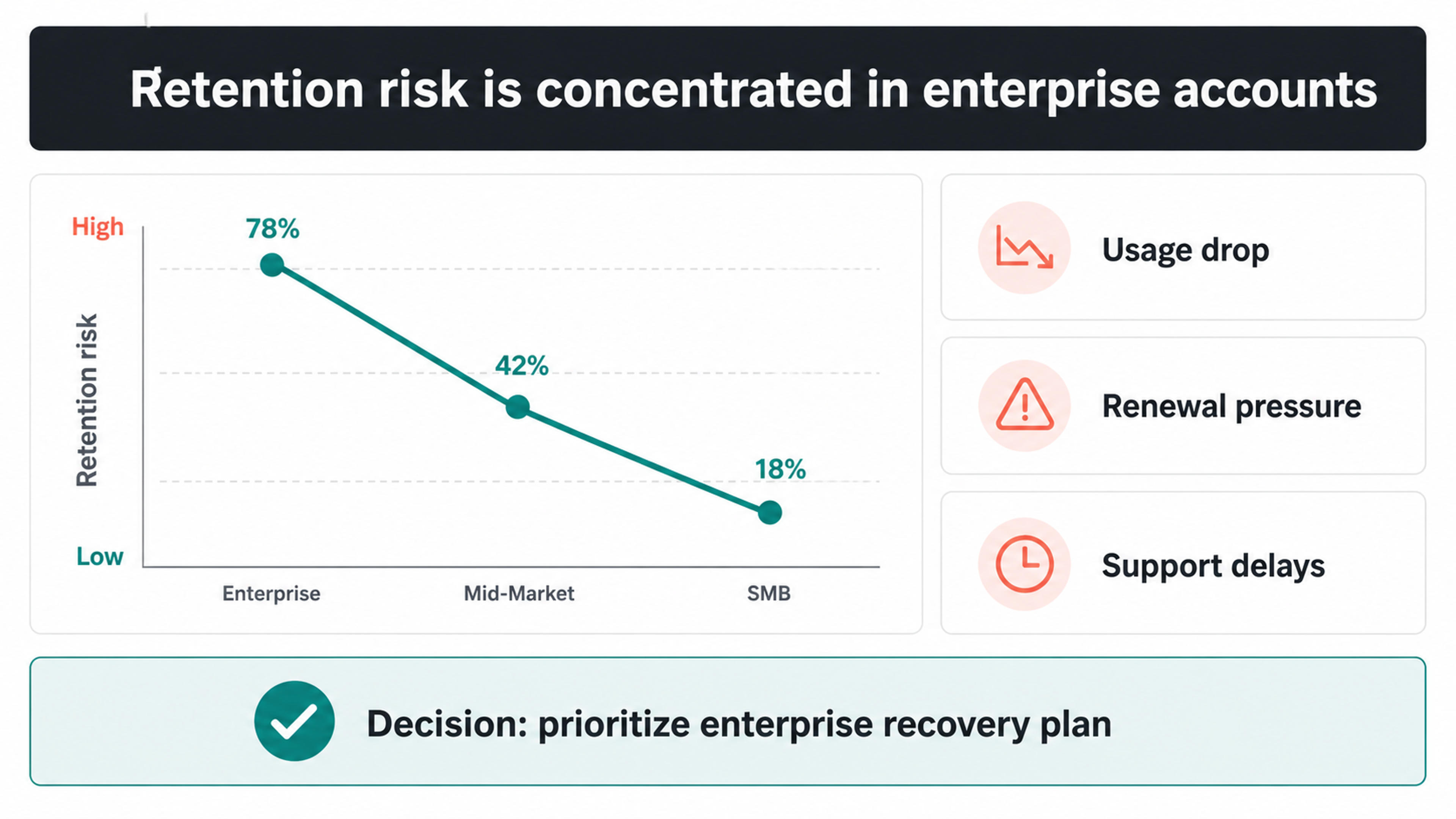
Report writing often builds toward a conclusion. Executive slide writing should usually start with the conclusion.
A strong slide has three levels of copy:
| Copy level | Purpose | Example |
|---|---|---|
| Slide title | States the takeaway | The current rollout plan concentrates risk in the first month |
| Supporting points | Explain the logic | Three teams depend on the same migration window |
| Detail or evidence | Proves the point | Dependency map, timeline, cost model, customer feedback |
Keep paragraphs short. Replace report-style transitions with direct explanation. Remove phrases that describe the document itself, such as this section discusses or as shown in the previous chapter. The slide should speak in business terms, not report-navigation terms.
A good executive deck often has a main narrative and an appendix. The main narrative should be short enough to support the meeting. The appendix should be complete enough to answer likely questions.
Move these items into backup:
Keep these items in the main deck:
This split helps the presentation feel confident without becoming thin. Leaders can follow the core story, and the presenter can still respond when someone asks for more detail.
Before sending the executive presentation, read only the slide titles in order. If they do not form a clear argument, revise the structure before polishing visuals.
Then check the deck against these questions:
Turning a long report into an executive presentation is not a formatting exercise. It is an editorial decision. Keep the core argument, choose the evidence that matters, and design the deck around the decision the reader needs to make.
Transform detailed reports into professional PowerPoint presentations
Convert PDF slides to editable PowerPoint online. Keep the original design and make text and slide elements editable. Free to use.
Turn Word documents into clear, structured, editable PowerPoint presentations with AI.
Turn notes, paragraphs, and ideas into a clear, editable PowerPoint presentation.
Paste text, add a YouTube or webpage link, or upload a document to create a beautiful, structured summary connected to the source.
Upload your source material and use SlidesPilot to turn the key findings into a polished, editable presentation.


