

Understand the complete document
Start with a report, paper, manual, or case study. AI connects headings, findings, evidence, and conclusions so the presentation grows from the meaning of your PDF.
Turn PDF reports, papers, and documents into a new presentation. AI extracts the key ideas, organizes the story, and designs editable slides for your audience. Free to use.
Upload a report, paper, or manual. AI turns its key ideas into a new presentation.
From research findings to executive briefings, explore new slide stories created from the ideas inside a PDF.
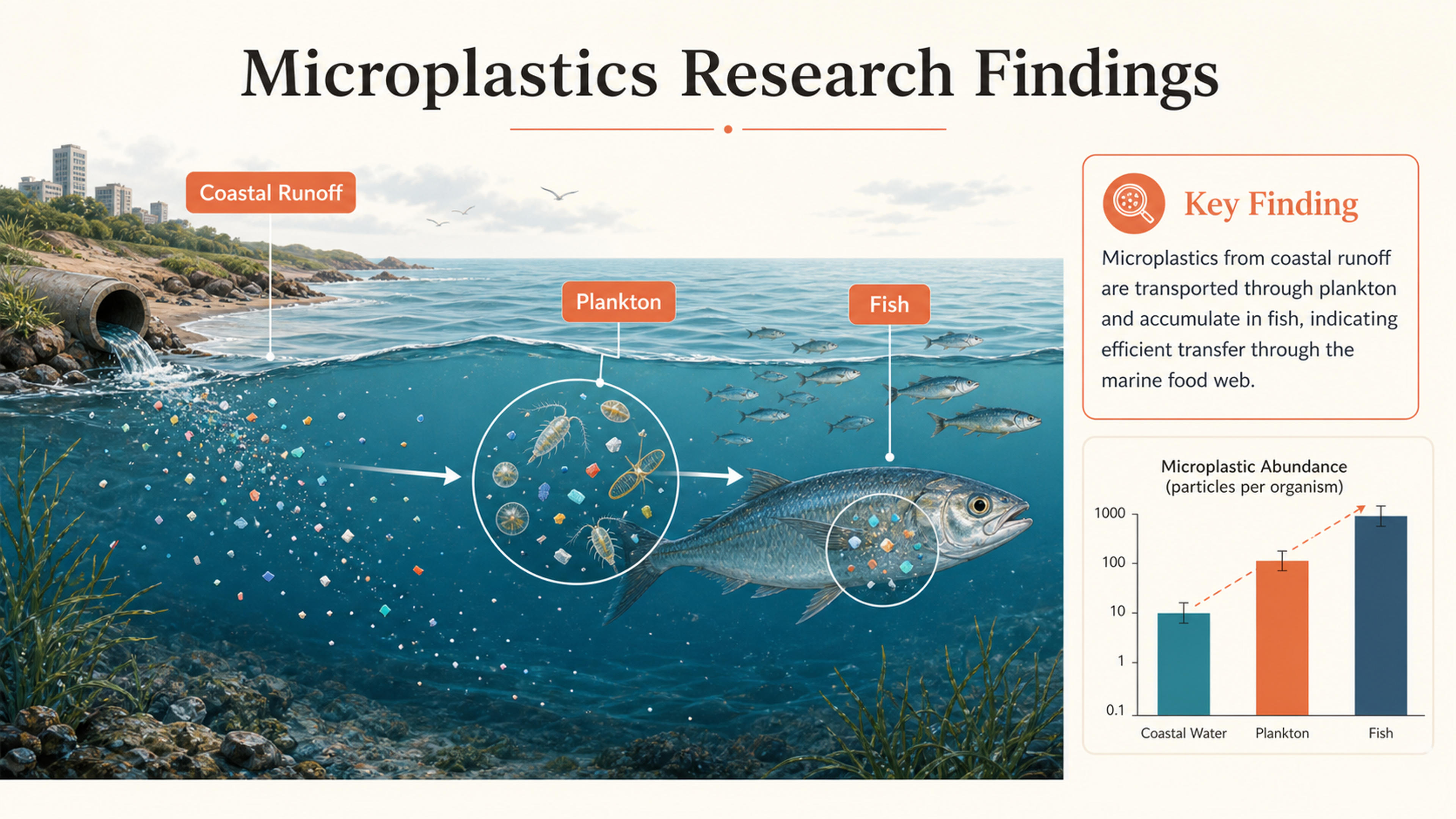
A research-paper PDF becomes an annotated marine-science figure with the evidence and key finding visible at a glance.
Create a new PowerPoint from your source material: understand the document, select the key ideas, and build a story for your audience.
Start with a report, paper, manual, or case study. AI connects headings, findings, evidence, and conclusions so the presentation grows from the meaning of your PDF.
Turn dense sections into focused slide content. Bring the main findings, useful examples, and recommendations forward while condensing background detail.
Guide the presentation with your audience, purpose, and points to emphasize. Create an executive brief, classroom lesson, research talk, or training deck from the same source.
Upload the source, set the direction, and create a presentation you can keep editing.
Add your report, research paper, manual, or other PDF document. SlidesPilot reads the text and visual content as the source for your slides.
Describe your audience and purpose, choose the slide count, and highlight the sections or findings you want to emphasize.
Choose a theme. AI organizes the ideas into an introduction, focused sections, supporting evidence, and a conclusion with new slide layouts.
Refine the wording, visuals, and design in SlidesPilot. Download an editable PPTX for Microsoft PowerPoint or export to Google Slides, PDF, or PNG.
Choose the sections, slide count, and audience. SlidesPilot turns dense PDF content into focused slides with supporting evidence and a new visual design.
AI uses the PDF’s headings, text, and section relationships to connect its argument, evidence, and conclusions.
Condense long documents into the findings, examples, and recommendations that support your presentation goal.
Build a natural speaking flow around ideas and decisions. Each slide has a clear role in the presentation.
Use AI text and visual understanding to work with scanned pages, multi-column documents, images, tables, and charts.
Keep key facts, numbers, findings, and supporting context connected to the source material as AI shapes the deck.
Keep control of the generated story and design. Edit your presentation and export a PPTX for your existing workflow.

Turn your resume or CV into an editable career presentation for interviews, portfolios, professional introductions, and personal branding.
Transform lengthy manuals into clear PowerPoint presentations
Transform Complex Case Files into Clear Presentations
Transform manuals and guides into PowerPoint presentations
Create stunning PPT presentations from source docs using the newest OpenAI model

Transform textbooks into PowerPoint presentations
Transform complex scientific research into PowerPoint presentations instantly
Turn a research paper into a clear, editable PowerPoint covering the question, methods, results, limitations, and citations.
Transform exam papers into PowerPoint presentations instantly
Transform complex journal articles into PowerPoint presentations
Transform homework assignments into PowerPoint presentations

Transform clinical documents into professional PowerPoint presentations
Transform dense financial data into clear PowerPoint presentations
Transform entire books into summaries and PowerPoint presentations
Yes. SlidesPilot’s AI PDF to PPT converter is free to use after signup, with no credit card required. Upload your document and create a presentation from its key ideas.
SlidesPilot reads your PDF, identifies its main ideas and supporting evidence, and organizes them into a new slide narrative. It creates presentation layouts around your audience and purpose, with an editable PowerPoint as the result.
Yes. Choose your slide count and describe the chapters, findings, or recommendations to emphasize. AI condenses the source into a focused presentation with the supporting context your audience needs.
Yes. Turn research papers into talks organized around the question, methods, findings, and conclusion. Use business reports for executive briefings, manuals for training, and classroom documents for lessons.
Yes. SlidesPilot uses AI text and visual understanding to read scanned pages and image-rich PDFs, then turn their content into a structured presentation.
AI understands the information in tables, charts, and figures and brings the relevant findings into the slide story. You can refine the resulting content and visuals in the presentation editor.
Yes. Set the audience, purpose, tone, slide count, and points to emphasize. Choose a theme and customize the generated slides to fit a lesson, research talk, client meeting, or executive briefing.
Yes. Edit the content and design in SlidesPilot, then download an editable PPTX for Microsoft PowerPoint. Google Slides, PDF, and PNG exports are also available.
Use the PDF to PPT Converter to restore the original text and slide elements while keeping the existing design. Use PDF to PPT AI when you want a new presentation generated from a document’s ideas.
Yes. Your uploaded document and generated presentation are private by default. You control when you share the presentation.
PDF TO EDITABLE POWERPOINT
Keep your existing slide design and make the text and elements editable. Convert your PDF presentation to PowerPoint, ready for updates and reuse.
Make PDF Slides Editable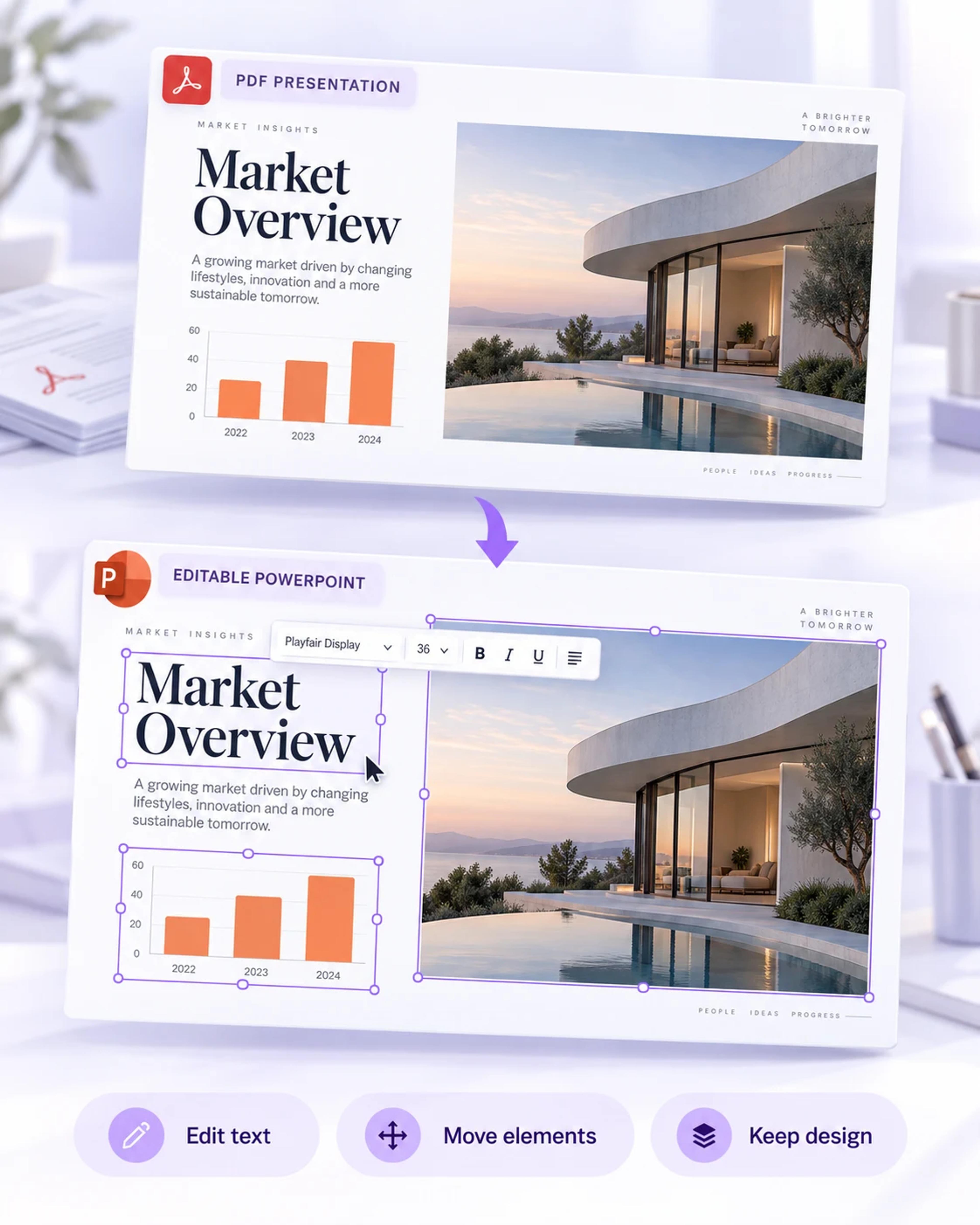
Your original presentation, ready for its next update.
Keep an existing PDF presentation’s design and recover editable text and elements.
Build a research presentation from the question, methods, and findings.
Turn a detailed report into a focused business presentation.
Create a presentation from a Word document.
Start with notes, an outline, or pasted text.
Understand and summarize source material before building your presentation.
Upload a report, research paper, or document. Let AI find the key ideas, build the slide story, and create an editable PowerPoint.